


Experience the full power of the financial markets on a big screen. The Olymp Trade Desktop App is designed for traders who demand speed, reliability, and precision. Unlike the browser version, the standalone app operates independently of your web browser’s load, ensuring lightning-fast trade execution (0.3ms) and zero lag during high market volatility.
- PC Version: 2.4.1 (Updated: January 2026 )
- License: Free
- Platforms: Windows 10/11, macOS (Intel & Apple Silicon)
To install the OlympTrade application on your computer, you must be registered on The platform. For quick registration you can use this form:

Or register using this link on the broker’s website


Why Professionals Choose the Desktop App?
- 🚀 Superior Speed: The app communicates directly with Olymp Trade servers, bypassing browser limitations. Charts load faster, and quotes update instantly.
- 🛡️ Enhanced Security: Built-in encryption protects your data from phishing attacks and browser-based malware.
- 📈 Advanced Charting: Use professional drawing tools, custom indicators, and multi-chart layouts that are more convenient to use on a monitor than on a mobile screen.
- 🔔 Desktop Notifications: Set price alerts and receive notifications directly on your desktop, even if the app is minimized.

System Requirements (2026)
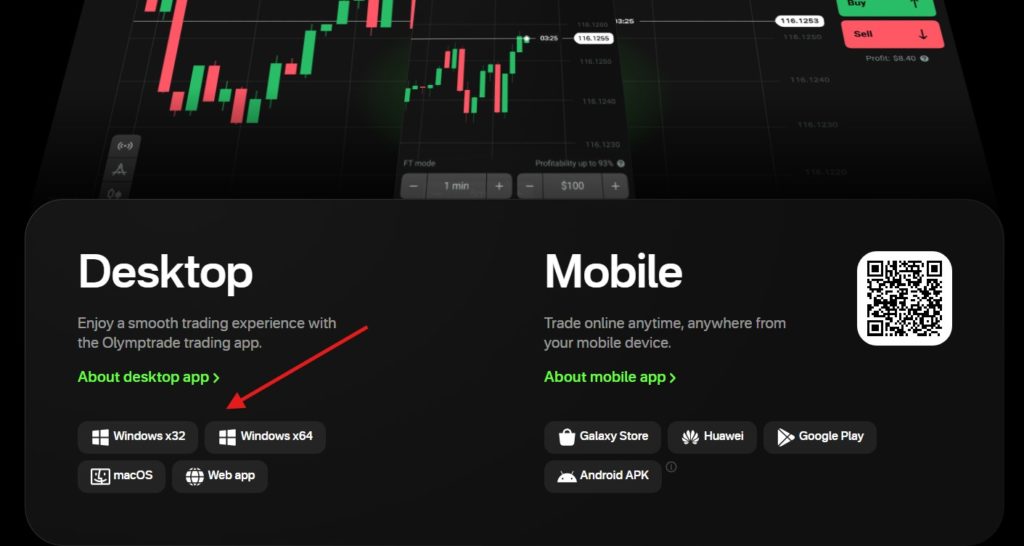
You can install the Olymp Trade terminal on your desktop and mobile devices. There are versions for Mac and Windows (both 32-bit and 64-bit). If you want to trade on your smartphone, visit this page.
Before downloading, ensure your computer meets these minimum specifications for optimal performance:
💻 System Requirements (Minimum)
| Component | Windows (PC) | macOS (Apple) |
|---|---|---|
| Operating System | Windows 10, 11 (32-bit or 64-bit) | macOS 10.15 (Catalina) or higher |
| Processor (CPU) | Intel Core i3 (2.0 GHz) / AMD Ryzen 3 | Intel Core i5 / Apple M1, M2, M3 |
| RAM Memory | 4 GB (8 GB Recommended) | 4 GB (8 GB Recommended) |
| Hard Disk Space | 250 MB free space | 300 MB free space |
| Screen Resolution | 1280 x 768 or higher | 1280 x 800 or higher |
To use the terminal, you need a login and password. If you do not have an account, register as a trader first. If you already have access, go straight to installation:
- Visit the official page to Download Olymp Trade for desktop.
- Find the installation file for your OS.
- When the download is complete, double-click on the file to launch the wizard.
- Follow the instructions to install the system.
- Log in with the username and password from the broker — find more information on how to login to the site.


Download App for Windows 10
The latest release of the Community Olymp Trade app for Windows 10 is available for versions 32 or 64-bit. Olymp Trade also offers a stable macOS version. What can users expect in the download?


The download is about 54.8 Mb in size. Installing it is quite fast depending on the internet speed. The Olymp Trade setup wizard takes a few seconds to initialize, and there are no complex options to choose from. After the installation, users need to log into their account or register.
What features are in the Olymp Trade for pc app? The functions are similar to the web platform. But the software runs as a standalone and not through the browser. The desktop app lacks lots of extra features such as copy-trading or trading robots. Olymp Trade has focused on fixing bugs and improving the application’s stability.
How to download app for IOS or Android
You can install the trading app on portable devices — tablets and smartphones. Both iOS and Android versions are available below.


Frequently Asked Questions (PC Version)
Is the Olymp Trade app for PC free to download?
Yes, the Olymp Trade desktop application is 100% free. There are no charges for downloading, installing, or updating the software.
Can I use my mobile account to log in to the PC app?
Absolutely. Your Olymp Trade account is universal. You can use the same login credentials (email and password) across all devices: PC, Android, and iOS. All your data and funds are synchronized in real-time.
My antivirus blocked the installation. What should I do?
Sometimes antivirus software may falsely flag financial applications. If you downloaded the file from the official source, it is safe. You can temporarily disable your antivirus or add the Olymp Trade installer to the exception list.
Does the app support Windows 7 or 8?
While the app may run on older versions like Windows 7, we strongly recommend using Windows 10 or 11. Microsoft has stopped supporting older systems, which may create security risks and performance issues.
Does the Olymp Trade app support 32-bit OS?
Yes, they provide a 32-bit version. Don’t know which OS version you’re currently running? Well, most computers are 64-bit, and to find out the version type, follow these steps:
-From the Windows Search bar, search for “Computer properties.”
-Choose System, Control Panel
-Check the System Type in the new window.
How do I update the Olymp Trade desktop app?
The application updates automatically. When a new version is released, the app will download and install it the next time you launch it. You don’t need to download the installer again.
Congratulations! You have installed a terminal for trading on the Olymp Trade platform on your PC.